User
Use the timer
Start a timer, save the work to Jira and check what you have logged today.
Before you start
Choose a project or internal activity and check the destination work item before starting.
0:20 · English narration with English and Portuguese captions.Download English captions
Application demonstration using fictional data.
Read the English transcript
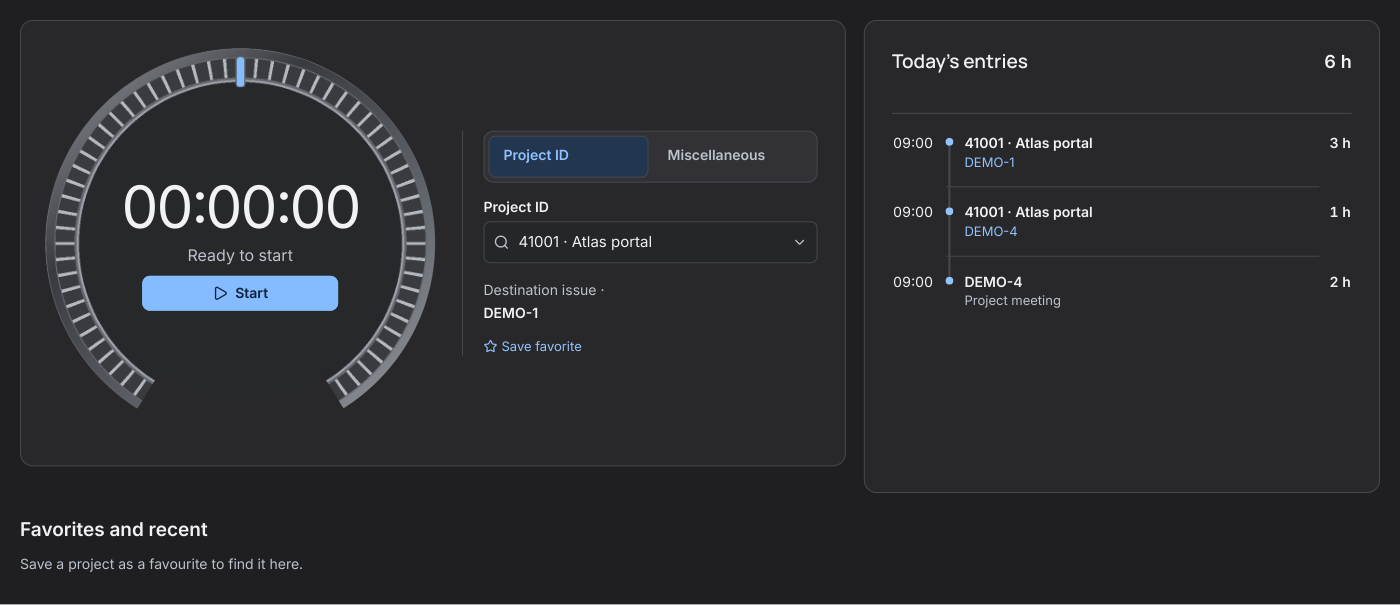
Open Timer and choose a project. For work on a Jira issue, ScopeTime records time on that issue under its Project ID. For internal work, select Miscellaneous and choose an activity.
Select Start to begin. After at least one full minute, select Stop and save. Check the issue and duration in today's entries.
Step by step
- Open Timer. Search by code or name under Project ID, or select an internal activity under Miscellaneous. You can also choose an item under Favorites and recent.
- Select Start in the centre of the dial when work begins. You can continue using Jira or return to the timer after reloading the page.
- When you finish, select Stop to save the time on the displayed issue. Jira saves whole minutes, with a one-minute minimum. Use Delete only to discard the running timer.
- Review Today’s entries for the total and your visible entries, newest first, in the organisation’s time zone. A partial query marks the total as provisional.
- If you already know how much time you worked, choose Log time already worked. The form keeps your current choice and lets you set the date, start time and duration.