Manager · Administrator
Complete a Jira user’s profile
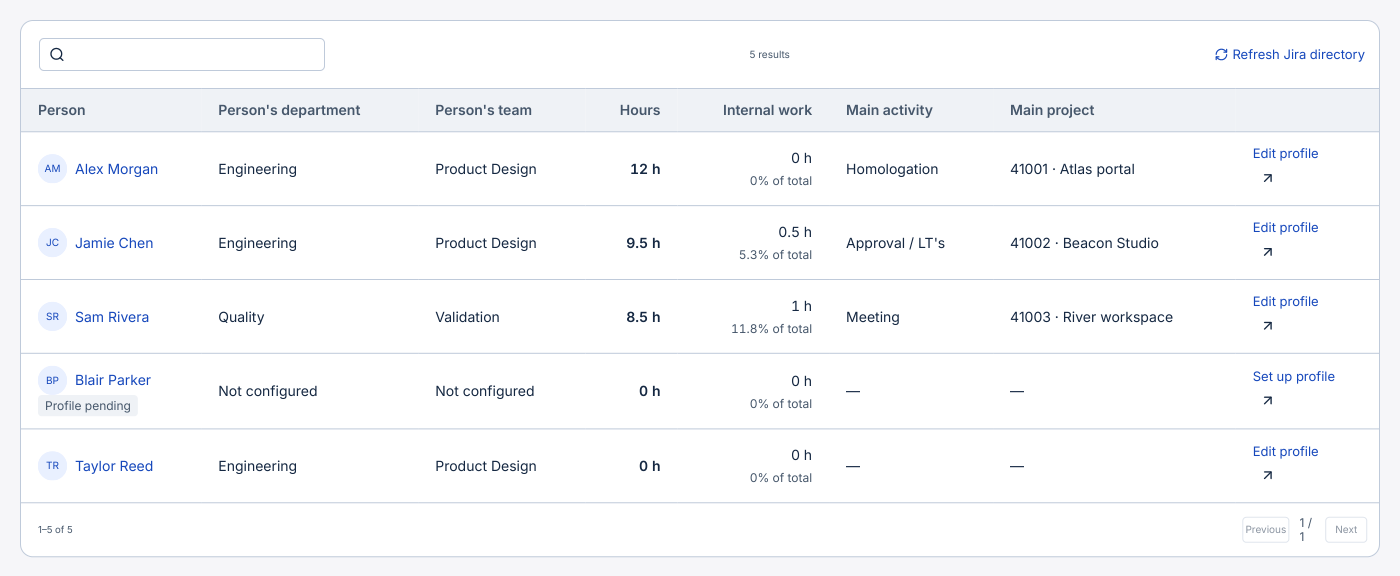
A person can appear in People before they have a ScopeTime profile or log their first hour.
Before you start
Directory access requires ScopeTime configuration rights and the Jira global permission Browse users and groups.
Step by step
- Open Analysis → People or Organization → People and schedules. The list brings together the active personal accounts Jira lets you browse and the profiles already configured.
- Search for a name. Profile pending identifies an account without a profile. Select Set up profile and enter what you know, such as department, team or weekly schedule.
- The employee number is optional and preserves leading zeros. Operational lists show the name. A profile with 00042 may appear as Ana Costa (00042) in report results and exports.
- Save the configuration. Return through Edit profile when more details become available. App access, email recipients and schedules have their own settings.
- Use Refresh Jira directory to read the directory again. If the query fails, you can work with saved profiles and check the permissions of the account that performed the lookup.