User · Manager · Administrator
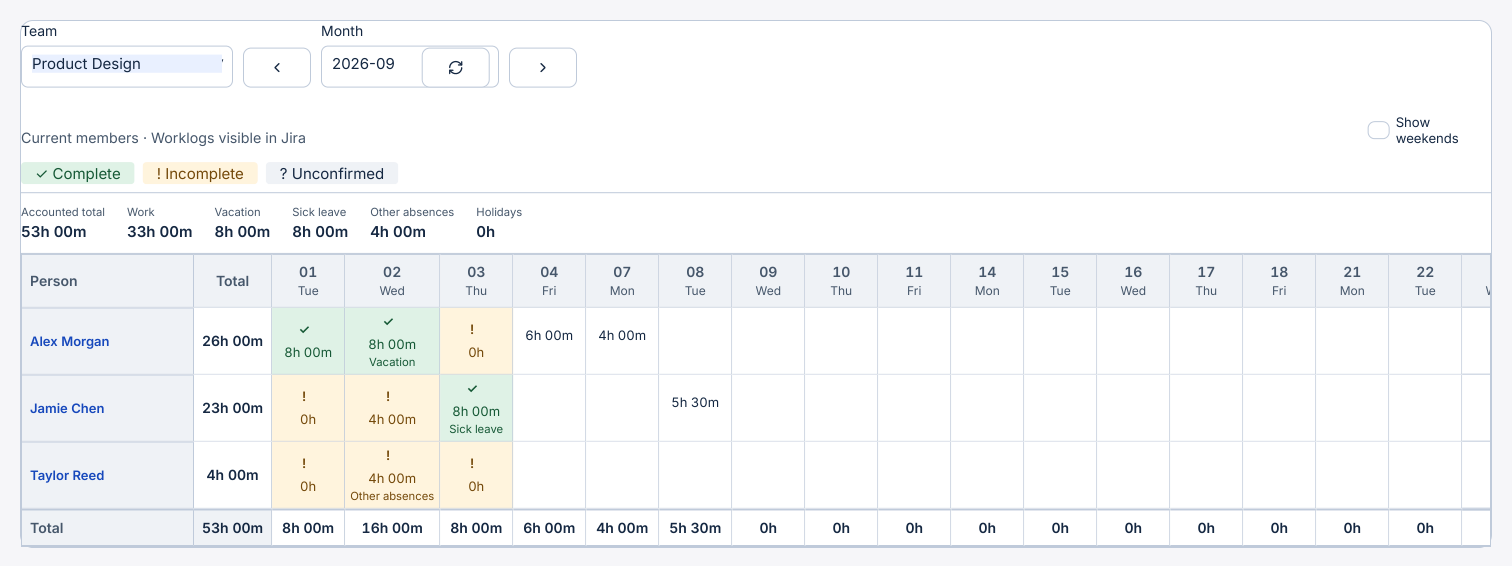
Read the monthly team timesheet
Check schedule coverage by person and day, including work, vacation, sick leave, other absences and public holidays.
Before you start
Open Analysis → Team timesheet. Team leads can view the teams they lead. Your account and Jira permissions determine which worklogs are visible.
Step by step
- Choose the team and month. The grid initially shows weekdays. Turn on Show weekends to display Saturday and Sunday. The monthly total also includes any time logged on those days.
- For a completed day, a green cell with ✓ means accounted hours cover the schedule. An exclamation mark flags missing hours. A question mark marks an unknown schedule or insufficient data.
- Open a cell to compare Work, Calendar hours and Scheduled hours. When the difference is known, the detail gives hours missing or above schedule and links to accessible Jira work items.
- Select a person’s name to open their individual analysis for the displayed month. Review the category totals and day-by-day figures.