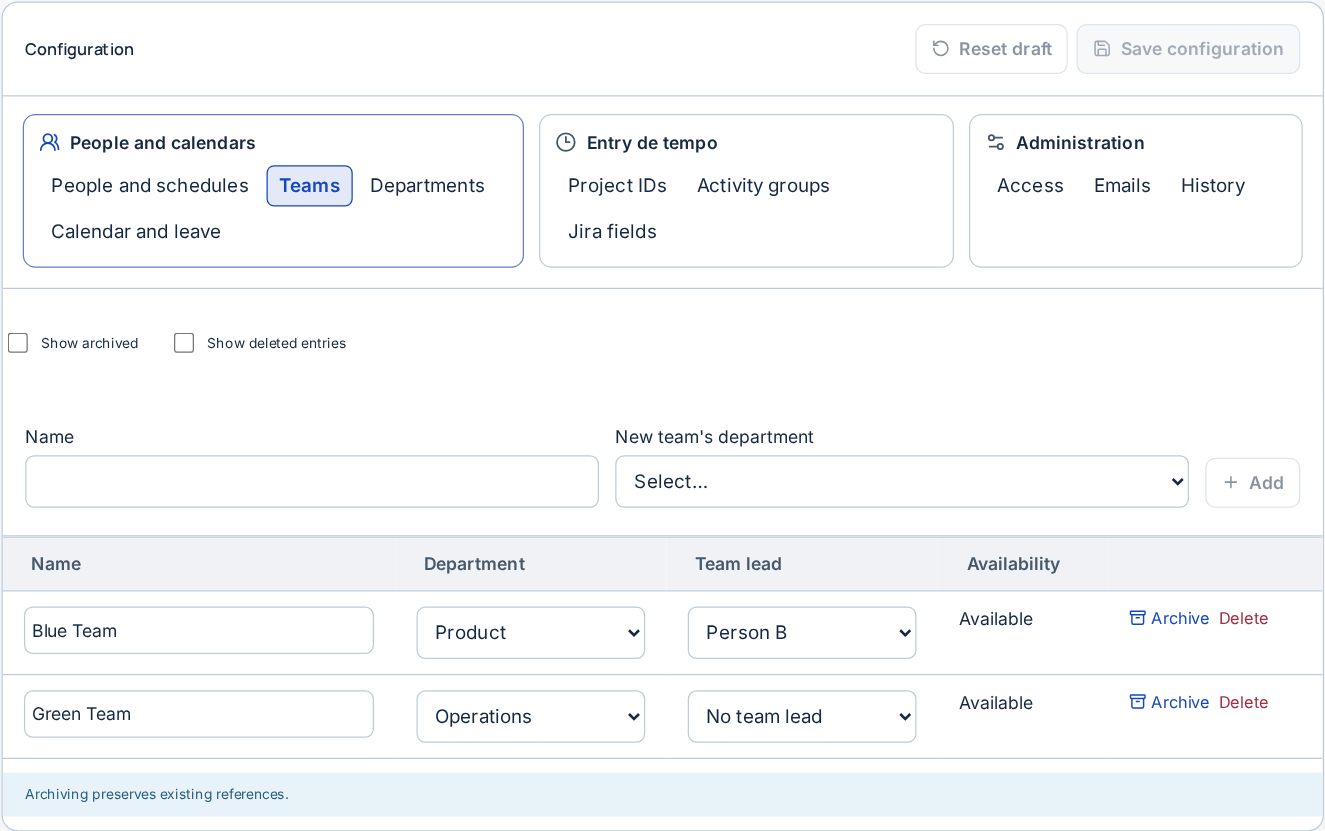
Teams
Create groups of people within each department. Teams are used in filters and hour breakdowns. To view an existing team's timesheet, open Analysis → Team timesheet.
Where to go Organization → People and calendars → Teams
How to do it
- As an organization manager or Jira administrator, check that the department exists. Create it under Departments if needed.
- Under Teams, enter a Name, choose the New team's department and select Add. The team appears in the draft table.
- The Jira administrator can select a lead in the team row. Under People and schedules, assign the department and team in each member's profile.
- Select Save configuration. To move a team to another department, change its department in the table and review the members' profiles before saving.
Example
Engineering has two teams, Testing and Development. To place someone in Testing, open their profile under People and schedules and choose Engineering and Testing.
Fields and options
- Name
- Required when creating a team. Use a name distinct from the other teams, up to 100 characters. To rename a team, edit the text in its row.
- New team's department
- Required. Choose an existing active department. If the list is empty, add a department first.
- Department
- In an existing team's row, choose the department it belongs to. Moving the team also updates the department on its members' profiles.
- Team lead
- Only a Jira administrator can change this field. Choose someone with an active profile to view this team's timesheet or leave No team lead selected.
- Availability
- Shows the team’s status. Archive preserves existing references. To make the team available again, show archived teams, select Reactivate and save.
- Show archived
- Include teams archived from the regular list. This filter is independent of Show deleted entries.
- Show deleted entries
- Find a deleted team. Restore returns it to the archived state. Also select Show archived to find it and Reactivate to use it again.
- Delete
- Asks for confirmation. If links or records prevent deletion, choose Keep archived when the app offers it.
No matching field.
How to check
Confirm the team appears in the team selector of someone in that department. After saving, the lead can review time in Analysis → Team timesheet.